

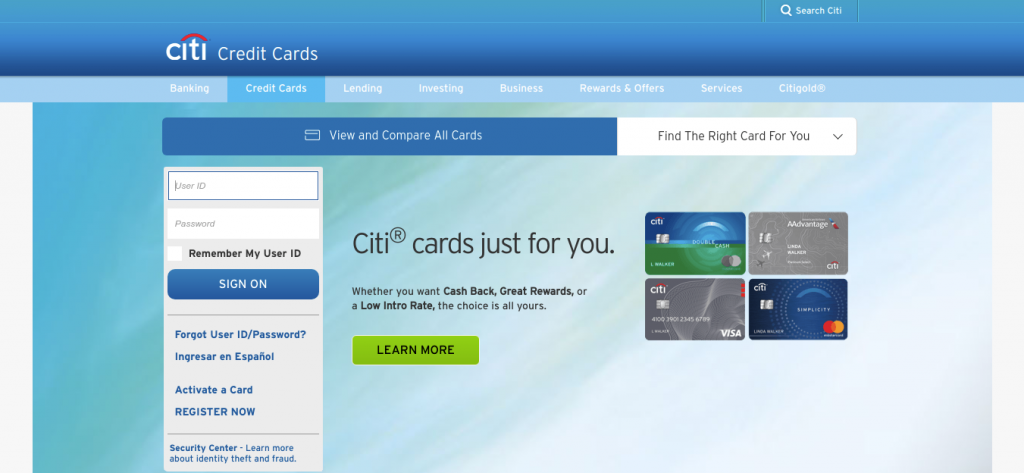
online.citi.com or via the Citi Mobile App.
AT&T Points Plus® Card from Citi is the premier co-branded rewards credit card designed for AT&T wireless and internet customers, earning Citi ThankYou® Rewards points, gas station rewards, grocery rewards, and up to $240/year in statement credits when setting up qualifying AT&T AutoPay billing.
Whether you need to log in to Citi Online Banking, submit an immediate monthly card payment with zero convenience fees, set up automatic recurring monthly AutoPay, redeem ThankYou Points for cash back or travel, manage fraud alerts, or contact 24/7 cardholder services, this comprehensive guide covers every payment channel and customer care contact.
AT&T Points Plus Card Payment Options Overview
Compare available payment options, fees, and posting speeds:
| Payment Channel | Convenience Fee | Posting Speed |
|---|---|---|
| Citi Online & Mobile App (Bank ACH) | $0.00 (Free) | Same-Day Credit if made by 11:59 PM EST |
| AutoPay (Automatic Bank Draft) | $0.00 (Free) | On Monthly Payment Due Date |
| Automated Phone System (IVR) | $0.00 (Free ACH) | Instant Confirmation |
| Citibank Branch Payment | $0.00 (Free) | Immediate In-Person Credit |
How to Pay Your AT&T Points Plus Citi Card Online (Step-by-Step)
- Navigate to: online.citi.com (or open the Citi Mobile App).
- Enter your User ID and Password in the sign-in box.
- Click “Sign On”.
- Select your active AT&T Points Plus Card from Citi.
- Click “Make a Payment”.
- Enter checking account routing number and bank account number.
- Choose payment amount: Minimum Payment Due, Statement Balance, or Custom Amount.
- Submit payment to receive an instant electronic confirmation receipt number.
Alternative Payment Channels
- AutoPay Setup: Automatically pay your monthly statement directly from your checking account on your due date with zero transaction fees.
- Pay by Phone: Call Citibank Cardholder telephone banking 24/7 toll-free at 1-800-950-5114 (or number on back of card).
- Pay by Mail: Send payment check with statement coupon to:
Citibank / AT&T Card Payments
P.O. Box 9001037
Louisville, KY 40290-1037
Citibank AT&T Cardholder Customer Support Directory
- Cardholder Customer Service (24/7): 1-800-950-5114 / 1-866-384-2851
- Citi ThankYou® Rewards Center: 1-800-842-6596
- Hearing Impaired (TTY/TDD): 1-800-325-2865
- Official Banking Portal: online.citi.com
- Card Issuer: Citibank, N.A., 388 Greenwich Street, New York, NY 10013
Frequently Asked Questions (FAQ)
How do I earn the AT&T bill statement credit?
Cardholders who spend $500 or more on eligible purchases during a billing cycle and enroll their AT&T Points Plus Card in AT&T AutoPay receive a $20 monthly statement credit (up to $240 annually).
How do I activate my new AT&T Points Plus Card?
Activate your card online at citi.com/activate or by calling 1-800-950-5114 with your 16-digit card number and last 4 digits of SSN.
Related Credit Card Guides:
Disclaimer: BillPayment.guide is an independent consumer credit guide and is not affiliated with, endorsed by, or operated by Citibank, N.A. or AT&T Inc. All trademarks belong to their respective owners.

Anisur Rahman brings over 17 years of experience at the intersection of complex technology and digital strategy to BillPayment.guide. Active in the digital space since 2009, Anisur uses his deep industry insights to break down financial technologies, secure online payment methods, and digital platforms. His actionable guides help readers navigate the fast-paced digital economy and manage their online transactions with confidence.
