

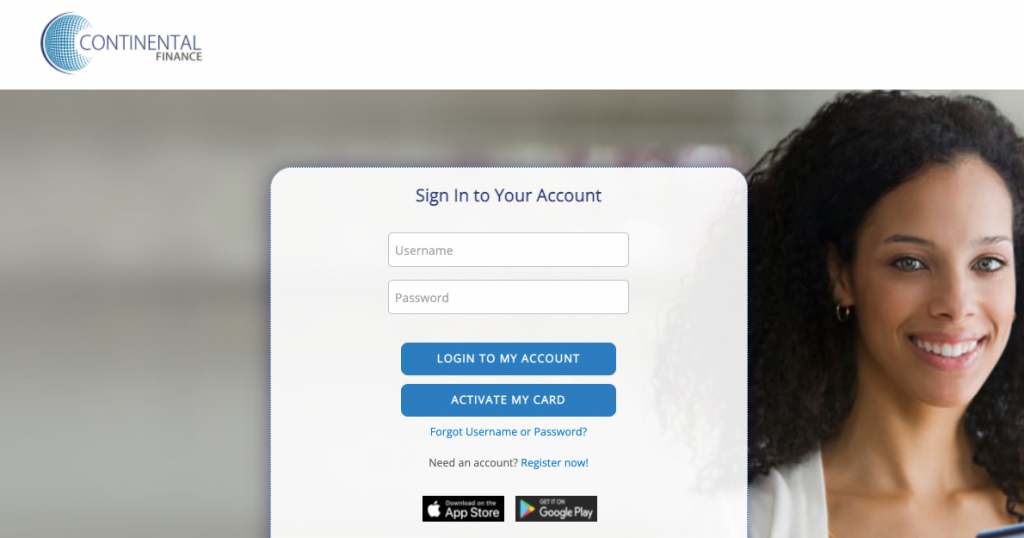
yourcreditcardinfo.com. Never enter your full 16-digit card number or Social Security Number on third-party websites.
Continental Finance Company is one of the leading credit card servicers for consumers working to establish or rebuild their credit history. Continental Finance manages several widely held Mastercard accounts, including the Surge®, Reflex®, FIT®, Verve®, and Cerulean® Mastercard® programs.
Activating your new credit card and setting up an online account allows you to track transactions in real time, view monthly billing statements, set up fee-free AutoPay, monitor your Experian VantageScore, and become eligible for automatic credit limit increases. This guide provides comprehensive instructions for logging in, registering, and activating your card.
Continental Finance Cardholder Portals & Brand Matrix
All cards serviced by Continental Finance share a centralized, secure account management infrastructure:
| Credit Card Program | Issuing Bank | Cardholder Portal |
|---|---|---|
| Surge® Mastercard® | Celtic Bank / The Bank of Missouri | yourcreditcardinfo.com |
| Reflex® Mastercard® | Celtic Bank / The Bank of Missouri | yourcreditcardinfo.com |
| FIT® / Verve® / Cerulean® | The Bank of Missouri | yourcreditcardinfo.com |
How to Activate Your New Continental Finance Credit Card
Step-by-Step Card Activation:
- Open your web browser and go to: activate.yourcreditcardinfo.com (or yourcreditcardinfo.com).
- Enter the Last 4 Digits of your Card Number.
- Enter the Last 4 Digits of your Social Security Number (SSN).
- Enter your 5-digit Billing ZIP Code.
- Click “Activate My Card” to complete identity verification.
- Alternatively, call the 24/7 automated activation hotline at 1-800-518-6142 from your registered phone number.
How to Register for Online Account Access
After activating your card, create your online profile to manage monthly payments:
- Navigate to yourcreditcardinfo.com and click “Register Now”.
- Enter the last 4 digits of your card, last 4 digits of your SSN, and ZIP code.
- Create a unique Username and secure password.
- Set up your security questions and confirm your contact email.
How to Log In & Pay Your Bill Online
- Visit yourcreditcardinfo.com.
- Enter your Username and Password.
- Click “Log In”.
- Go to Payments > Pay Bill, link your checking account routing and account number, select the amount (Minimum Due, Statement Balance, or Custom Amount), and submit.
Credit Bureau Reporting & Credit Limit Increases
- Monthly Credit Bureau Reporting: Continental Finance reports your payment history and balance to all three major credit bureaus (Equifax, Experian, TransUnion) monthly.
- Credit Limit Doubling Opportunity: After making your first 6 consecutive monthly minimum payments on time, your account may qualify for a doubled credit limit (e.g., from $500 to $1,000) with zero additional security deposit.
Troubleshooting Login Issues & Password Reset
Forgot Username or Password?
- Click “Forgot Username or Password?” on the login portal.
- Provide the last 4 digits of your card, SSN, and billing ZIP code.
- Verify identity via email confirmation link or SMS code.
- Reset your credentials and log in immediately.
Continental Finance Customer Service Directory
- Automated Card Activation (24/7): 1-800-518-6142
- Live Customer Service: 1-866-449-4174 (Mon–Fri 7:00 AM – 10:00 PM, Sat 9:00 AM – 4:00 PM EST)
- Automated Payment Line: 1-800-556-5678
- Payment Mailing Address:
Continental Finance
P.O. Box 6812
Carol Stream, IL 60197-6812
Frequently Asked Questions (FAQ)
Is there a fee to pay my Continental Finance credit card bill online?
No. Payments made online via ACH electronic check at yourcreditcardinfo.com or via AutoPay are 100% free of charge. Expedited phone payments processed with a live representative may incur an agent fee.
How do I enroll in free monthly credit score tracking?
Log into your online account, navigate to Services > Free Credit Score, and opt into electronic delivery to view your updated Experian VantageScore 3.0 every 30 days.
What should I do if my Continental Finance card is lost or stolen?
Immediately call 1-866-449-4174 to freeze your card, cancel the compromised card number, and have a new card expedited with zero fraud liability protection.
Related Credit Card Guides:
Disclaimer: BillPayment.guide is an independent financial education portal and is not affiliated with, endorsed by, or operated by Continental Finance Company, LLC, Celtic Bank, or The Bank of Missouri. Member FDIC.

Anisur Rahman brings over 17 years of experience at the intersection of complex technology and digital strategy to BillPayment.guide. Active in the digital space since 2009, Anisur uses his deep industry insights to break down financial technologies, secure online payment methods, and digital platforms. His actionable guides help readers navigate the fast-paced digital economy and manage their online transactions with confidence.
