

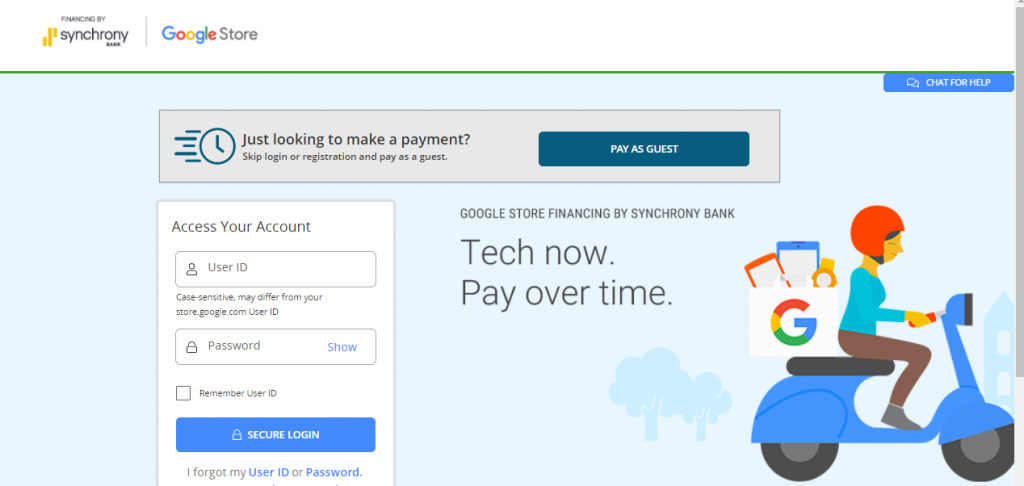
google.syf.com.
Purchasing a new Google Pixel smartphone, Pixel Watch, Pixel Tablet, or Nest smart home device is made affordable through Google Store Financing. However, managing your payments, viewing monthly billing statements, and checking your credit balance require logging into the dedicated Synchrony Bank Google portal rather than the standard Google account store page.
This comprehensive guide covers everything you need to know about logging in to your Google Store Financing account, using Quick Pay/Guest Pay without logging in, making payments by phone or mail, resetting credentials, and contacting customer support.
What is Google Store Financing?
Google Store Financing is a revolving credit line issued by Synchrony Bank (one of the largest retail credit card issuers in the United States). It allows approved customers to finance purchases made directly on the Google Store with special promotional financing options, such as 0% APR for up to 24, 36, or 48 months on eligible Pixel and Nest devices.
Key details to keep in mind:
- Card Issuer: Synchrony Bank
- Account Portal: google.syf.com
- Payment Due Dates: Monthly billing cycle with minimum payments required
- Credit Reports: Account activity reports to major credit bureaus (Equifax, Experian, TransUnion)
How to Log In to Your Google Store Financing Account Online
Managing your account online allows you to set up automatic payments (AutoPay), check your available credit limit, view paperless statements, and track your promotional financing balances.
Step-by-Step Login Instructions:
- Open your web browser and navigate directly to the official portal: google.syf.com/login.
- Enter your registered User ID in the first field.
- Enter your Password in the second field.
- (Optional) Check the “Remember User ID” box only if you are on a personal, secure device.
- Click the “Secure Log In” button to access your account dashboard.
How to Pay Google Store Financing as a Guest (No Login Required)
If you need to make a quick, one-time payment before your due date without registering or logging in, Synchrony Bank provides a convenient Pay as Guest feature.
Steps for Guest Payment:
- Visit google.syf.com.
- Click on the “Pay as Guest” button located near the top right or bottom of the login box.
- Enter your Card/Account Number.
- Provide the Last 4 Digits of your SSN (Social Security Number).
- Enter your Billing ZIP Code.
- Click Continue, choose your payment amount, and enter your checking account routing and account numbers to submit payment.
Other Ways to Pay Your Google Store Financing Bill
If you prefer not to pay online, Synchrony Bank offers multiple alternative payment channels:
| Payment Method | Details & Instructions | Processing Time |
|---|---|---|
| By Phone | Call Synchrony Automated System: 1-866-397-0063. Have your account number and routing number ready. | Same-day / 1 Business Day |
| By Mail | Send check or money order (with your account number in the memo) to: Synchrony Bank P.O. Box 71715 Philadelphia, PA 19176-1715 |
5–7 Business Days |
| AutoPay (Recommended) | Log into your online account and configure recurring monthly withdrawals on your due date. | Automated Monthly |
How to Register Your New Account Online
When you are approved for financing at Google Store checkout, you receive an account number in your confirmation email and via postal mail. You must create an online profile to manage your account.
- Go to google.syf.com and click “Register”.
- Enter your Account Number and 5-digit ZIP Code.
- Verify your primary identity via SMS or email code.
- Create a unique User ID and strong Password.
- Select security questions and confirm your contact email address.
Troubleshooting Login Issues & Password Reset
Forgot User ID:
- Click “I forgot my User ID” on the login screen.
- Enter your account number, last 4 digits of your SSN, and date of birth.
- Your User ID will be displayed on screen or sent to your verified email.
Forgot Password:
- Click “Reset Password” on the login portal.
- Enter your User ID and ZIP code.
- Complete the two-factor authentication security prompt.
- Set a new password meeting Synchrony’s security requirements (8+ characters, mixed case, numbers, and special symbols).
How to Avoid Interest on Google Store 0% Financing
Google Store Financing frequently features promotional 0% APR terms (e.g., 24 months for Pixel phones or 36 months for higher-tier hardware). To ensure you pay zero interest:
- Pay on time every month: Late payments may void promotional financing terms and trigger standard APR rates and late fees (up to $41).
- Pay the full promotional balance within the term: If any remaining balance exists after the promotional period ends, standard purchase APR applies to the remaining amount.
- Set up AutoPay: Ensure your automatic payment is set to at least the equal monthly promotional installment rather than just the minimum payment.
Customer Support Contact Information
Because Google and Synchrony handle different aspects of your purchase, ensure you contact the correct support team:
- For Financing, Bill Payments, Statements, or Disputes:
- Phone: 1-866-397-0063 (Synchrony Bank Customer Care)
- Hours: Mon–Fri 8:00 AM – 12:00 AM EST, Sat–Sun 9:00 AM – 9:00 PM EST
- Online Portal: google.syf.com
- For Device Shipping, Hardware Returns, or Warranty Claims:
- Online Support: Google Store Support Portal
Frequently Asked Questions (FAQ)
Does applying for Google Store Financing hurt my credit score?
When you submit a full application for Google Store Financing, Synchrony Bank performs a hard credit inquiry, which may cause a minor, temporary dip in your credit score. Pre-qualification checks, when available, generally use a soft inquiry with no score impact.
Can I pay off my Google Store Financing balance early?
Yes. There are no prepayment penalties with Synchrony Bank. You can pay off your remaining balance in full at any time to free up your credit line.
Can I use my Google Store Financing account to buy non-Google products?
No. Google Store Financing is a closed-loop store credit line designated exclusively for purchases made on the official Google Store online.
Related Guides:
Disclaimer: BillPayment.guide is an independent educational resource and is not affiliated with, endorsed by, or operated by Google LLC or Synchrony Bank. All trademarks, service marks, and company names are the property of their respective owners.
PHP: 2026-08-19 06:29:34 [notice X 0][/home/billpayment/public_html/wp-content/plugins/elementor-pro/core/editor/editor.php::129] Using ${var} in strings is deprecated, use {$var} instead [array (
‘trace’ => ‘
#0: Elementor\Core\Logger\Manager -> shutdown()
‘,
)]
PHP: 2026-08-19 06:34:16 [notice X 0][/home/billpayment/public_html/wp-content/plugins/elementor-pro/core/editor/editor.php::129] Using ${var} in strings is deprecated, use {$var} instead [array (
‘trace’ => ‘
#0: Elementor\Core\Logger\Manager -> shutdown()
‘,
)]

Anisur Rahman brings over 17 years of experience at the intersection of complex technology and digital strategy to BillPayment.guide. Active in the digital space since 2009, Anisur uses his deep industry insights to break down financial technologies, secure online payment methods, and digital platforms. His actionable guides help readers navigate the fast-paced digital economy and manage their online transactions with confidence.